1. Overview
Accessibility means that people can use a product or service whatever their abilities. For a website, a document or an app, it means the content works in several ways. It works with a screen reader. It works from a keyboard or a switch. It has captions. It is clear enough for someone who finds dense text hard.
This lesson covers three things. First, who these people are. Second, why the European Union now requires most consumer-facing digital services to be accessible. Third, what the standards mean when they call something "accessible". It also separates two kinds of check. There is what an automated tool such as Accessibility Checker can find, and there is what you must judge yourself.
The rest of the course covers the detail. That means the Web Content Accessibility Guidelines (WCAG) 2.2, the European standard EN 301 549 and the European Accessibility Act (EAA). None of it makes sense without the people it serves. So that is where we start.
2. Who accessibility is for
The definition in the law
Article 3(1) of the EAA defines "persons with disabilities". They are "persons who have long-term physical, mental, intellectual or sensory impairments which in interaction with various barriers may hinder their full and effective participation in society on an equal basis with others". Recital 3 says the wording comes from the United Nations Convention on the Rights of Persons with Disabilities (UN CRPD). The EU and every Member State have ratified that Convention.
Read the definition slowly, because its structure is the point. The disability is not the impairment on its own. It is the impairment "in interaction with various barriers". A web page with proper alternative text, headings and labelled controls does not hinder a blind person. A page without them does. The page is the barrier, and the page is what you can change.
The social model: barriers, not people
This idea is called the social model of disability. The older medical model puts the problem in the person. Each person is then treated or helped one case at a time. The social model puts the problem in the environment. Examples are steps without a ramp, a video without captions and a form with no labels.
The EAA follows the social model. Every requirement in it falls on a product or a service, never on a person. The only question it asks of your website is whether the site contains barriers.
The definition names four kinds of impairment: physical, mental, intellectual and sensory. In practice that covers people who:
- are blind or have low vision
- cannot tell colours apart
- are deaf or hard of hearing
- cannot speak
- have limited dexterity or strength
- have photosensitive epilepsy
- have a cognitive, language or learning impairment, such as dyslexia or aphasia.
Many people have more than one of these. EN 301 549 turns the list into eleven "functional performance" needs. The next lesson covers them.
Permanent, temporary and situational
EN 301 549 V4.1.1 clause 4.1 says that "any differences in ability may be permanent, temporary or situational". Annex E.3 repeats the point. That one sentence makes accessibility a mainstream requirement. The barrier that stops a blind user also stops a driver whose eyes are on the road. Captions serve a commuter without headphones as well as a deaf viewer.
| The user cannot | Permanent | Temporary | Situational |
|---|---|---|---|
| See the screen | Blindness | Eye surgery, dilated pupils after an eye test | Driving, cooking, bright sunlight on a phone |
| Tell colours apart | Colour vision deficiency, which affects roughly one man in twelve | Some medications | A cheap projector, a monochrome print-out, night mode |
| Hear | Deafness | An ear infection | A noisy station, a quiet library, no headphones |
| Point precisely or use both hands | Motor impairment, tremor, a missing limb | A broken wrist in a cast | Holding a child, wearing gloves, a bumpy bus |
| Speak | Non-verbal, speech impairment | Laryngitis | An open-plan office, a sleeping household |
| Read fluently or remember | Dyslexia, intellectual impairment, dementia | Concussion, medication, grief | Stress, tiredness, a second language, distraction |
Who else benefits
The EAA widens the circle itself. Recital 4 says that "other persons who experience functional limitations, such as elderly persons, pregnant women or persons travelling with luggage, would also benefit". It defines "persons with functional limitations" to include age-related impairments and limitations that are "permanent or temporary". In design terms, the people who benefit include:
- Older people. Many have reduced vision, hearing, dexterity and memory at the same time. They are a growing share of every customer base.
- Mobile users. A layout that reflows, large touch targets and one-thumb operation are fixes that WCAG already asks for.
- People in noisy or bright places. They rely on captions, transcripts and strong contrast.
- People on slow or metered connections. Text alternatives and transcripts give them the content before the media arrives.
- Keyboard users, voice control users and search engines. All of them rely on the same code structure as assistive technology.
3. Why organisations act: the legal and business drivers
Until recently, most private sector accessibility work in Europe was voluntary. Procurement rules or complaints drove it. Two Directives changed that. One covers the public sector. The other, the EAA, covers a long list of consumer products and services.
| Driver | Instrument | Who it reaches | What it asks for |
|---|---|---|---|
| The European Accessibility Act | Directive (EU) 2019/882. Member States had to transpose it by 28 June 2022 and apply it from 28 June 2025 (Article 31) | Economic operators that place listed products on the market, and service providers that provide listed services to consumers, after 28 June 2025 (Article 2) | Compliance with the Annex I requirements. For services, public information that explains how (Article 13 and Annex V) |
| The Web Accessibility Directive | Directive (EU) 2016/2102 | The websites and mobile applications of public sector bodies | Accessibility, an accessibility statement, a feedback mechanism and national monitoring |
| Procurement | EAA Article 24(1), read with Directives 2014/24/EU and 2014/25/EU | Anyone who sells in-scope products or services to public buyers | Annex I becomes a mandatory technical specification in tenders. Buyers ask for evidence, usually an EN 301 549 report |
| Complaints and enforcement | EAA Articles 23, 29 and 30 | Service providers and economic operators in the Member State concerned | National authorities check compliance and follow up complaints. Consumers and representative organisations can go to court. Each Member State sets its own penalties |
The EAA in brief
Article 2 lists what is in scope. The products are:
- consumer computer hardware and operating systems
- payment terminals
- certain self-service terminals: cash machines, ticketing machines, check-in machines and interactive information terminals
- consumer equipment for electronic communications
- consumer equipment for accessing audiovisual media
- e-readers.
The product rules apply to products placed on the market after 28 June 2025. The services are:
- electronic communications services
- services that give access to audiovisual media
- the websites, apps, electronic tickets, travel information and self-service terminals of air, bus, rail and waterborne passenger transport
- consumer banking services
- e-books and the software for reading them
- e-commerce services.
The service rules apply to services provided to consumers after 28 June 2025. Article 4(5) exempts microenterprises that provide services from the service requirements.
Article 32 gives transition periods. Products in lawful use for a service before 28 June 2025 may stay in use until 28 June 2030. Service contracts agreed before that date may run until they expire, but for no longer than five years. Self-service terminals may stay in use for up to twenty years. Lesson 3 explains how a Directive becomes national law. Module 4 covers the obligations in detail.
The business case
The commercial argument does not depend on the law. A page that a screen reader cannot parse is a page that a search engine indexes badly. A checkout that needs precise mouse work loses customers on phones. Captions keep viewers who would scroll past a silent video. Every barrier you remove for a person with a disability is removed for everyone else who meets it. The law sets the deadline. The users set the reason.
4. What "accessible" means, and what automation can find
The four words in the Directive
The EAA does not define "accessible" in the abstract. For websites and apps it says what accessibility consists of. Annex I Section III(c) requires service providers to make "websites, including the related online applications, and mobile device-based services, including mobile applications, accessible in a consistent and adequate way by making them perceivable, operable, understandable and robust". Recital 47 borrows the four definitions from the Web Accessibility Directive:
- Perceivable: users must be able to perceive the information and the interface. That means text alternatives, captions, structure that survives being read aloud, and enough contrast.
- Operable: users must be able to operate the interface and the navigation. That means keyboard operation, no focus traps, enough time, no dangerous flashing, and targets that are big enough.
- Understandable: users must be able to understand the information and how the interface works. That means readable language, predictable behaviour, labelled fields and helpful error messages.
- Robust: a wide range of user agents, including assistive technologies, must be able to interpret the content reliably. That means correct names, roles and values in well-structured code.
These are the four WCAG principles, remembered as POUR. The Directive does not name WCAG, because a law should not depend on a document that a private consortium can revise. Instead, Article 15 gives a presumption of conformity to harmonised European standards. The harmonised standard is EN 301 549. It carries WCAG 2.2 Level A and AA into three clauses. Clause 9 covers web content, clause 10 covers documents and clause 11 covers software and apps. Lesson 3 follows that chain.
What an automated audit finds
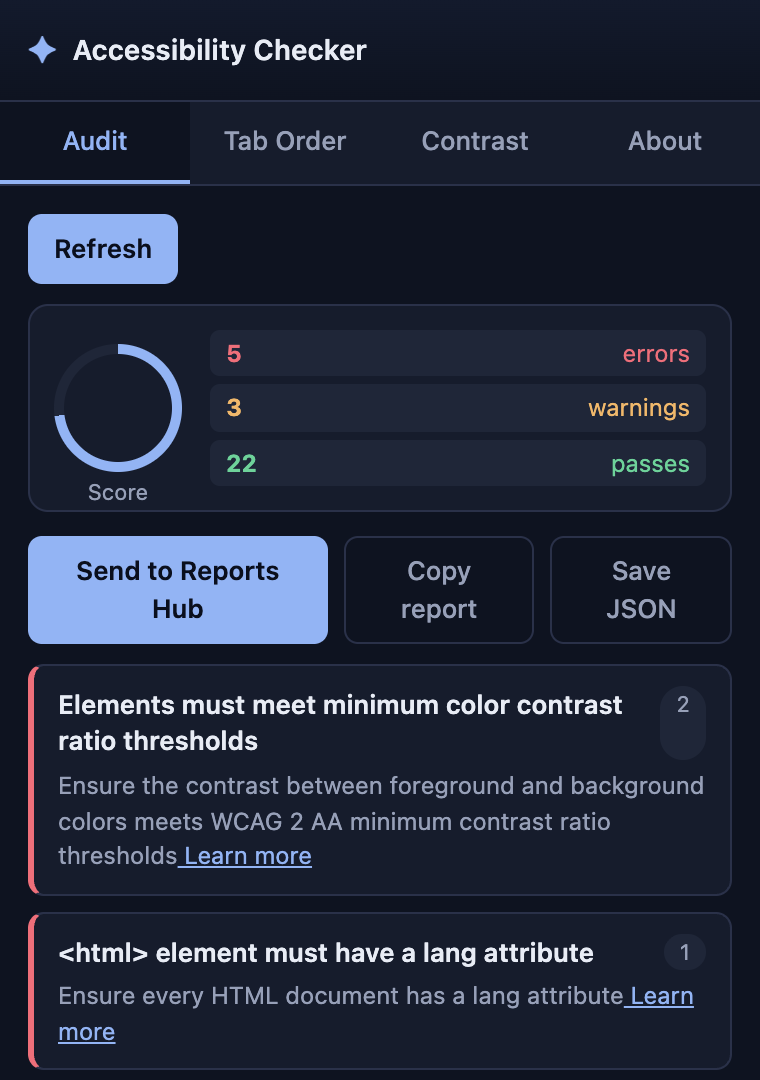
Accessibility Checker runs axe-core, an open source rules engine, against a loaded page. The rules decide what a machine can decide. For example:
- an image has no
altattribute - a form field has no label
- a button or link has no accessible name
- the page has no
langattribute - an ARIA attribute is invalid
- heading levels skip
- two colours in the stylesheet fall below the contrast ratio.
These findings are objective and repeatable, and they name the exact element. So they are the right place to start.
The rules cannot decide whether the content is right. A machine can see that alternative text exists. It cannot tell whether the text says what the image means. It cannot check whether captions match the speech. It cannot check whether the reading order makes sense, or whether an instruction says "click the green button". It does not know where focus lands when a dialog closes, or whether a time limit can be turned off. Those criteria need a person. "No violations" says nothing about them.
EN 301 549 clause 14.1 adds that an add-on or overlay becomes part of the page under test. So an overlay widget cannot stand in for fixing the content.
The app's report keeps this distinction visible. Its section "What this scan covers, and what it can't" sorts the fifty WCAG 2.1 Level A and AA success criteria into three groups. The groups are: checked automatically, need human review, and beyond any automated page scan. The human review group is your manual checklist.
Note the version. The app audits against WCAG 2.1. WCAG 2.2 added six Level A and AA criteria:
- 2.4.11 Focus Not Obscured (Minimum)
- 2.5.7 Dragging Movements
- 2.5.8 Target Size (Minimum)
- 3.2.6 Consistent Help
- 3.3.7 Redundant Entry
- 3.3.8 Accessible Authentication (Minimum)
No automated rule covers them. So they belong on your manual list from the start. The Mac Safari extension lists "Needs review" items separately. On iPhone and iPad, Settings can switch Audit Findings to "Include needs review".
5. Common failures
- Treating accessibility as a feature for "a few blind users". The team ships without ever trying the product with a keyboard or a screen reader.
- Saying "our customers do not have disabilities". Disability is defined by the interaction with barriers. The customers who hit the barriers mostly leave without telling you.
- Building a separate "accessible version" instead of removing the barriers in the main one. The separate version always falls behind. Clause 4.1 expects access to the full functionality.
- Installing an overlay widget and calling the site compliant. Under clause 14.1 the overlay is tested as part of the page. It fixes no missing labels, captions or structure.
- Reading "no violations" in an automated audit as "conforms to WCAG". The report's human review list is the other half of the job.
- Assuming the EAA starts at your next redesign. It applies to services provided to consumers after 28 June 2025. Only the Article 32 transition periods soften that.
- Confusing the two Directives. The Web Accessibility Directive covers public sector bodies. The EAA covers listed consumer products and services from any economic operator. A public body's online shop can be under both.
- Publishing an accessibility statement that claims full conformance on the strength of an automated scan.
7. Knowledge check
Five questions. Score 4 or more to pass this lesson. Retry as often as you like. Your best result is kept.
Sources
- Directive (EU) 2019/882 (the European Accessibility Act), EUR-Lex: recitals 3, 4 and 47; Articles 2, 3, 4, 13, 23, 24, 29, 30, 31 and 32; Annex I Section III; Annex V.
- Directive (EU) 2016/2102 on the accessibility of the websites and mobile applications of public sector bodies, EUR-Lex.
- United Nations, Convention on the Rights of Persons with Disabilities, Article 1.
- ETSI, CEN and CENELEC, EN 301 549 V4.1.1 (2026-09), clauses 4.1 and 14.1 and Annex E.3, available from the ETSI standards server.
- W3C, Web Content Accessibility Guidelines (WCAG) 2.2, the four principles, and Diverse Abilities and Barriers from the Web Accessibility Initiative.
- Accessibility Checker user guide: Create reports and accessibility statements (the "What this scan covers, and what it can't" section) and the Mac Safari extension.

